Microsoft 365 — work, communication, security
A comprehensive solution for businesses: collaboration, automation and data protection — from small businesses to enterprises.
Microsoft Entra ID Identity
 Microsoft Entra ID Identity
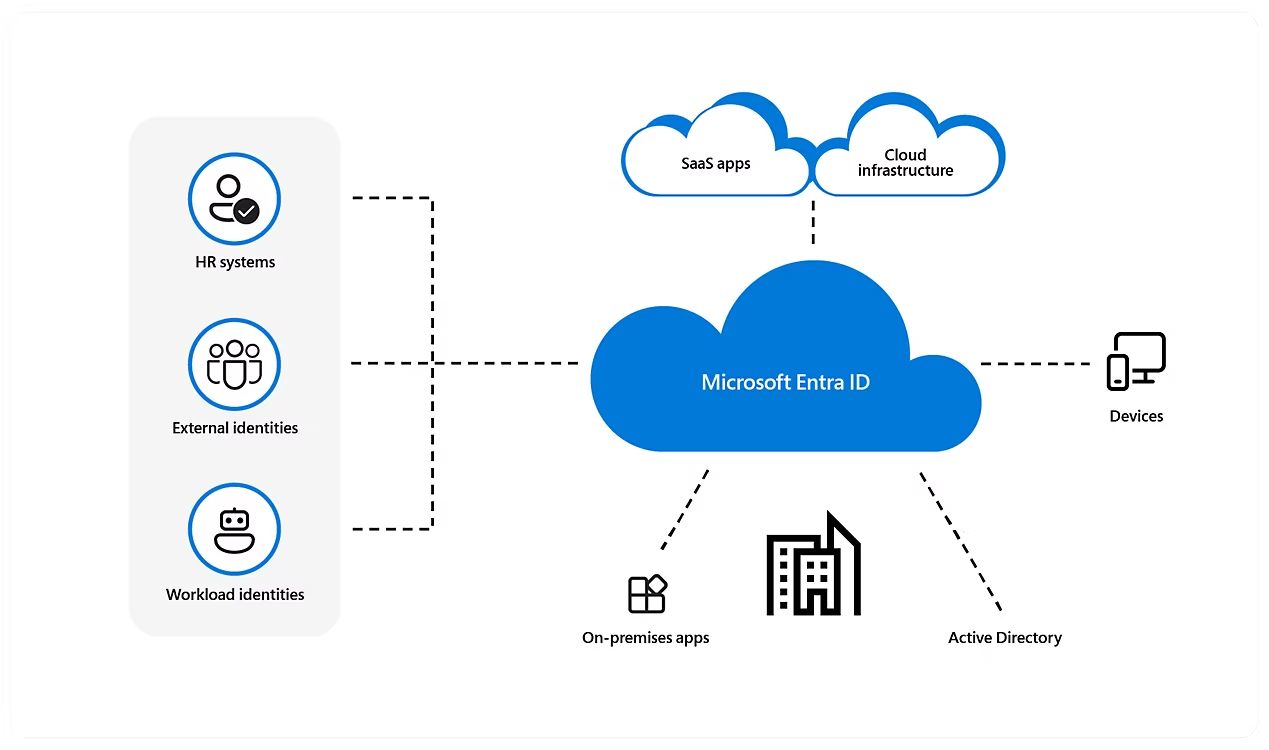
Microsoft Entra ID (formerly Azure AD) is the central identity engine for Microsoft 365 and Azure. It provides SSO to hundreds of applications, risk-based MFA and Conditional Access, privileged identity management (PIM) and identity protection using security signals. Combined with Intune and Microsoft Defender, it enables a practical implementation of the Zero-Trust model across the entire organisation.
Key capabilities
- SSO to cloud and on-premises applications (Enterprise Applications, SAML/OIDC/WS-Fed).
- MFA (including passkeys, Microsoft Authenticator) and Conditional Access with device state, location and risk awareness.
- Entra ID PIM: just-in-time privileged access, approvals, enforced MFA and full audit.
- Identity Protection: sign-in/user risk detection and automated remediation.
- External identities: B2B/External Identities (secure partner collaboration, invitation flows).
- Deep integration with Intune (device compliance), Defender XDR, M365 and Azure services.
Scenarios and benefits
- Hybrid work: access only from compliant devices (Intune) + CA policies (MFA, location, risk).
- Secure B2B collaboration: external partners with limited, supervised access.
- Least privilege: PIM for admins and application roles with audit and enforced MFA.
- Risk reduction: blocking risky sign-ins, enforcing password resets, session policies.
Best practices (Zero-Trust)
- Enable MFA for everyone and protect privileged accounts (PIM + CA + no standing roles).
- Conditional Access policies per application and risk level, with device control (Intune compliance).
- Use Identity Protection and alerts, automate remediation of risky activities.
- Regularly review access (Access Reviews) and limit permission inheritance.
Licensing — summary (P1 vs P2)
| Area | Entra ID P1 | Entra ID P2 |
|---|---|---|
| SSO / basic CA / MFA | ✓ | ✓ |
| Advanced Conditional Access (risk, sessions) | — | ✓ |
| Identity Protection (user/sign-in risk) | — | ✓ |
| Privileged Identity Management (PIM) | — | ✓ |
| Access Reviews, just-in-time, enforcement | Basic | Advanced |
Copilot in Microsoft 365
 Copilot in Microsoft 365
Copilot accelerates daily work in Outlook, Word, Excel, PowerPoint and Teams. It operates within the user's permission boundaries (Entra ID), respects sensitivity labels and DLP policies — ensuring it only uses data you have access to.
Summaries, replies and inbox organisation.
Building AI agents and workflows on company data.
What can Copilot do?
- Outlook: writes and summarises messages, suggests replies, extracts decisions and next steps.
- Word: drafts, tone and style changes, shortening/expansion, summaries.
- Excel: data analysis, formulas and charts, insights, scenario comparison.
- PowerPoint: slide generation from summaries/Word documents, ordering and layouts.
- Teams: meeting summaries, task and decision lists, quick context search.
Power Platform — automation and innovation
 Power Platform — automation and innovation
A low‑code ecosystem comprising Power Apps (applications), Power Automate (automation), Power BI (analytics), Copilot Studio (AI agents) and Power Pages (portals). The shared layer is Dataverse, while security and compliance are provided by Entra ID, DLP and RBAC.
- Build applications and automations in days; hundreds of connectors (M365, Dynamics 365, Azure and SaaS).
- Built-in Copilot helps create flows and applications using natural language.
- Centralised management: environments, DLP policies, ALM (pipelines) and access control.
Deployment scenarios
- Internal applications (forms, registers, workflows) with Power Apps.
- Process automation (approvals, integrations, RPA) in Power Automate.
- KPI dashboards and management reports in Power BI.
- B2B/B2C portals for customers and partners with Power Pages.
- Agents and chats on company data with Copilot Studio.
Exchange Online — enterprise-class business email
 Exchange Online — enterprise-class business email
Secure email, calendar and contacts in the Microsoft 365 cloud. High availability, advanced protection against spam and phishing, and simple management of mailboxes, groups and permissions.
Key capabilities
- Professional email with a company domain, calendars, groups and resources (rooms, equipment).
- Shared mailboxes, aliases, forwarding, transport rules.
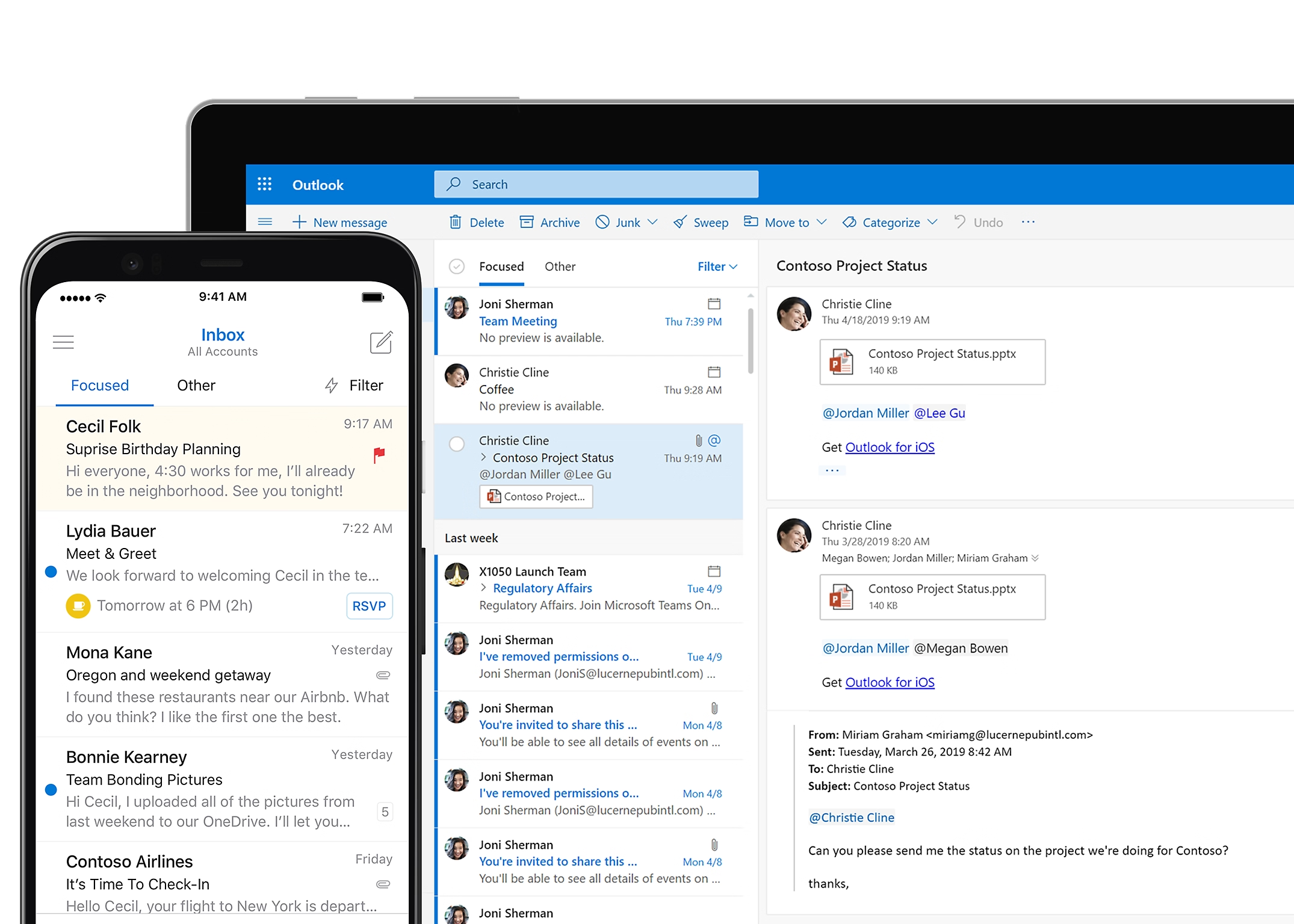
- Outlook (desktop, web and mobile), IMAP/POP/SMTP support (subject to policies).
- Online archiving, retention and eDiscovery — compliance with legal requirements.
Protection and compliance
- Built-in anti-spam/anti-phishing protection (Exchange Online Protection).
- Extended protection with Defender for Office 365 (Safe Links/Attachments, AIR in P2).
- Sensitivity labels, message encryption (OME), DLP and MTA‑STS/DMARC/SPF/DKIM.
- Easy auditing, reports and administrative alerts.
Migrations and integrations
- Migrations from on-premises Exchange/IMAP or other clouds (cutover, staged, hybrid).
- Hybrid mode with on-premises Exchange, centralised rules and mail flow.
- Integration with Microsoft Entra ID (MFA, Conditional Access) and Intune.
SharePoint — collaboration and intranet
 SharePoint — collaboration and intranet
Modern team and communication sites, content storage and sharing, automations and organisation-wide search — a coherent intranet on the Microsoft 365 platform.
Key capabilities
- Team and communication sites, hub sites and easy page creation.
- Document libraries, versioning, approval workflows and metadata.
- Lists (tasks, requests, registers) and forms.
- Organisation-wide search and navigation.
Scenarios and benefits
- Intranet and internal communications (news, department pages).
- Project collaboration and knowledge repositories.
- Automations with Power Automate (document workflows, approvals).
- Access control and compliance (DLP, sensitivity labels).
OneDrive — secure files in the cloud
 OneDrive — secure files in the cloud
Store, sync and share files with Microsoft 365 protection. Versioning, incident recovery and integration with Windows, macOS and Office applications.
Key capabilities
- Cross-device sync, Files On‑Demand and known folder move (KFM).
- File versioning and recovery after attacks (Ransomware detection & recovery).
- Secure link sharing with rights control and expiry dates.
- Seamless integration with Word/Excel/PowerPoint and Teams.
Scenarios and benefits
- Backup of key user folders and easy recovery.
- Real-time collaboration on documents.
- External sharing with DLP policies and sensitivity labels.
- IT visibility and audit (reports, alerts, activity).
Planner — simple planning and task boards
 Planner — simple planning and task boards
Kanban boards, assignments, deadlines and notifications — integrated with Teams and Outlook. Ideal for simple task management in teams and projects.
Key capabilities
- Boards, buckets, labels, checklists and attachments.
- Assignments, priorities, deadlines and reminders.
- Progress views and simple reports.
- Integration with Teams, Outlook, To Do and Project for the web.
Scenarios and benefits
- Sprint planning, request handling, team boards.
- Employee onboarding and quality control checklists.
- Simple PMO — quick assignments and statuses.
- Automations with Power Automate (notifications, integrations).
Microsoft Bookings — reservations and meeting scheduling
 Microsoft Bookings — reservations and meeting scheduling
A simple application for scheduling meetings with clients: a public booking page, employee calendars, automatic confirmations and reminders, and integration with Outlook and Microsoft Teams. A Bookings link can be added to an employee's email signature (e.g. via CodeTwo) so clients can book a time slot with a single click.
Key capabilities
- Public booking page with custom branding, service categories and team availability.
- Automatic email/SMS confirmations and reminders, cancellation policies.
- Integration with Outlook and Teams (online meetings created automatically).
- Multiple calendars, roles and permissions, custom field forms.
Scenarios and benefits
- Sales and consultations: clients self-select a time slot, less back-and-forth correspondence.
- Support and service: booking queues, limits and time windows, reports.
- Training and recruitment: online sign-ups, automatic Teams links.
- Link in employee email signature → quick one-click meeting scheduling.
Microsoft Loop — real-time co-authoring
 Microsoft Loop — real-time co-authoring
Flexible components you can embed in Outlook, Teams or pages — they update in real time everywhere they are placed.
Key capabilities
- Components (tables, lists, tasks) working synchronously across multiple applications.
- Loop pages and spaces for team collaboration.
- M365 integrations (Outlook, Teams, OneNote) and M365 security.
- Tasks and checklists synchronised with Planner/To Do.
Scenarios and benefits
- Brainstorming, meeting notes, kickoff documents.
- Content reviews and rapid material iterations.
- Cross‑team collaboration without copy‑paste.
- Up-to-date data in all places simultaneously.
Microsoft Teams — communication and collaboration
 Microsoft Teams — communication and collaboration
Meetings, chat and file sharing in one place. Integrations with M365 applications and external services, with telephony available in Enterprise plans.
Key capabilities
- Online meetings, webinars, chat and channels (standard/shared).
- Recordings and transcripts stored in OneDrive/SharePoint.
- Apps and bots, integrations with Power Platform and hundreds of services.
- Teams Phone (optional): telephony, call queuing, IVR and local numbers.
Security and management
- Meeting, recording and guest policies; application management.
- Sensitivity labels, DLP, eDiscovery and archiving.
- Call quality insights, alerts and reports for IT.
- Compliance with industry standards (depending on plan).
Microsoft Viva — Employee Experience Platform (EXP)
 Microsoft Viva — Employee Experience Platform (EXP)
An EX platform combining communication, engagement, learning and employee wellbeing — directly in Microsoft Teams and M365. Modules such as Viva Connections, Engage, Learning, Insights, Goals, Amplify and Pulse help build organisational culture and improve outcomes.
Key capabilities
- Consistent intranet and communication in Teams (Viva Connections, Amplify).
- Engagement and communities (Viva Engage, announcements, campaigns).
- Learning in the flow of work (Viva Learning) with company and partner content.
- Data-driven wellbeing and productivity (Viva Insights).
Scenarios and benefits
- Onboarding and leadership communication to the entire organisation.
- Skills development and learning paths with completion tracking.
- Goal setting and tracking (Viva Goals), mood pulses (Viva Pulse).
- Better organisational culture and talent retention.
Microsoft Defender for Endpoint
 Microsoft Defender for Endpoint
A comprehensive AI-based endpoint security platform — protecting Windows, macOS, Linux, Android, iOS and IoT devices, enabling threat detection, analysis and automated response.
Key capabilities
- Ransomware attack disruption and encryption blocking.
- AI engine (Security Copilot), automated investigation and response (AIR).
- Attack surface reduction: ASR, firewall, device control, conditional access.
- EDR, vulnerability management and threat intelligence.
Licensing plans
- P1 (often in M365 E3): next-gen AV, ASR, firewall, device control, basic capabilities.
- P2 (in M365 E5): everything in P1 + EDR, AIR, vulnerability management, Threat Intelligence, sandbox.
- Defender for Business (in M365 Business Premium): enterprise-class protection for organisations up to 300 users.
Microsoft Intune — device management and compliance
 Microsoft Intune — device management and compliance
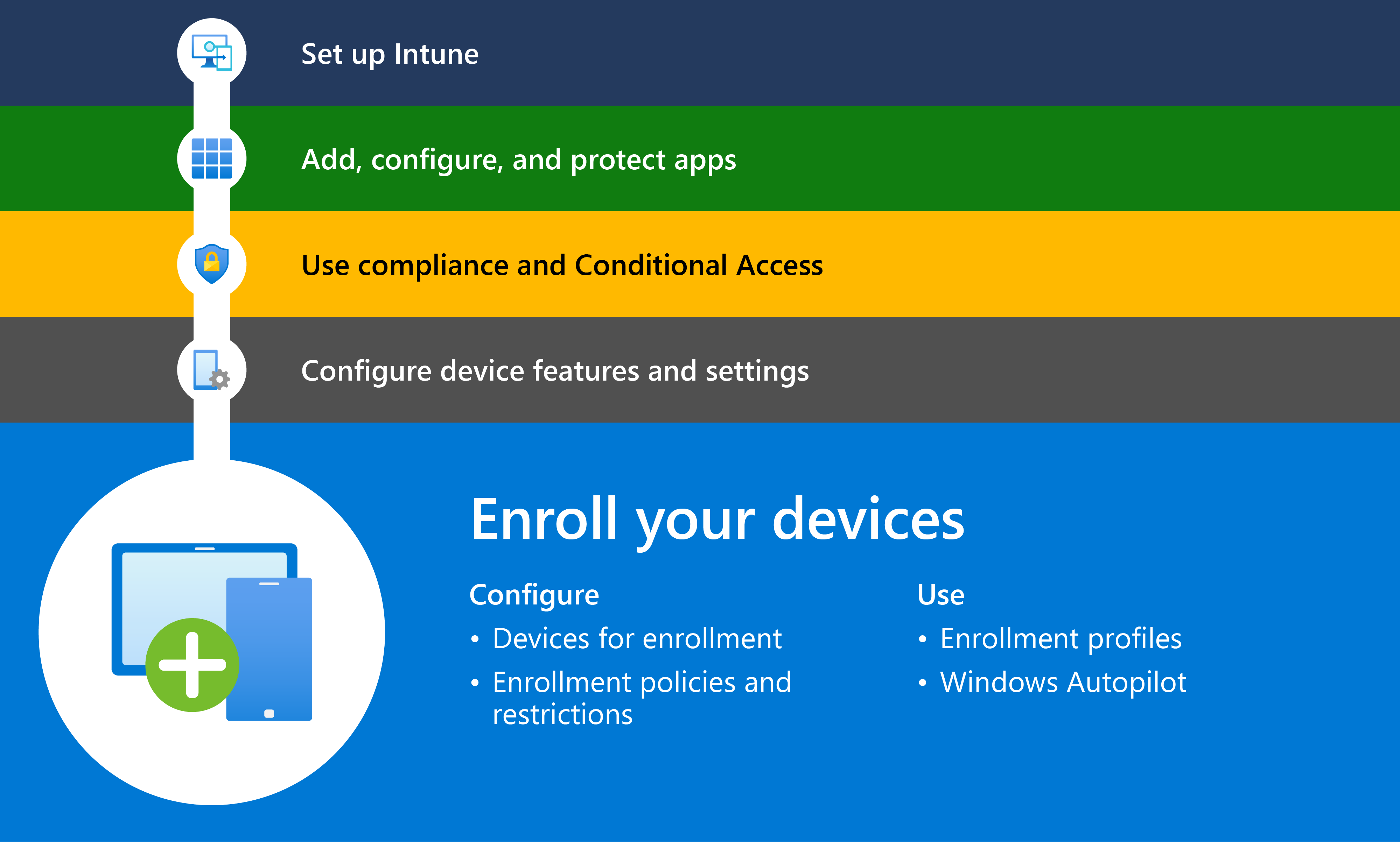
Microsoft Intune (part of the Microsoft 365 family) provides centralised MDM/MAM: device enrolment, application and policy deployment, security enforcement and compliance for Windows, macOS, iOS/iPadOS and Android. It works with Entra ID and collaborates with Microsoft Defender and conditional access to protect company data regardless of location.
Key capabilities
- Device enrolment and management (Windows Autopilot, Apple ADE/DEP, Android Enterprise).
- Configuration and security policies (BitLocker/FileVault, Firewall, Wi-Fi/VPN, certificates).
- Application management (Win32/MSIX, Microsoft Store, VPP, Managed Google Play) and updates.
- Compliance + Conditional Access (block access when device does not meet requirements).
- Data protection: App Protection Policies (MAM) for M365 apps — including BYOD.
- Reports, inventory, remote actions (wipe, lock, reset passcode, sync).
Scenarios and benefits
- Secure remote work — access only from policy-compliant devices.
- Fast workstation deployments (Autopilot) and reduced Helpdesk workload.
- Consistent configuration and lower risk of security incidents.
Microsoft 365 plan comparison
| Feature / Application | Business Basic | Business Standard | Business Premium | Enterprise E3 | Enterprise E5 |
|---|---|---|---|---|---|
| Exchange Online email | ✓ | ✓ | ✓ | ✓ | ✓ |
| OneDrive (1 TB/user) | ✓ | ✓ | ✓ | ✓ | ✓ |
| SharePoint Online | ✓ | ✓ | ✓ | ✓ | ✓ |
| Teams (meetings/chat) | ✓ | ✓ | ✓ | ✓ | ✓ (telephony/AV advanced) |
| Planner | ✓ | ✓ | ✓ | ✓ | ✓ |
| Bookings | — | ✓ | ✓ | ✓ | ✓ |
| Loop (components) | ✓ | ✓ | ✓ | ✓ | ✓ |
| Office apps (Word/Excel/PP/Outlook) | Web | Desktop+Web | Desktop+Web | Desktop+Web | Desktop+Web |
| Access/Publisher (Windows) | — | ✓ | ✓ | ✓ | ✓ |
| Power Apps (app creation) | Add‑on / limited | Add‑on / limited | Add‑on / limited | Add‑on / limited | Add‑on / limited |
| Power Automate (flows) | Add‑on / limited | Add‑on / limited | Add‑on / limited | Add‑on / limited | Add‑on / limited |
| Power BI Pro | — | — | — | — | Optional / add‑on |
| Power Pages (portals) | Add‑on | Add‑on | Add‑on | Add‑on | Add‑on |
| Copilot Studio (AI agents) | Add‑on | Add‑on | Add‑on | Add‑on | Add‑on |
| Intune (device management) | — | — | ✓ | ✓ | ✓ |
| Defender for Business / Endpoint | — | — | Defender for Business | Add‑on / P1 selected | Defender for Endpoint P2 |
| Defender for Office 365 | P1 | P1 | P1 | Add‑on / P1 | P2 |
| Microsoft Viva (selected modules) | Add‑on | Add‑on | Add‑on | Add‑on | Add‑on |
| Teams Phone (telephony) | — | Add‑on | Add‑on | Add‑on | Add‑on |
| Azure Information Protection | — | — | P1 | P1 | P2 (advanced) |
| eDiscovery / Compliance | Basic | Basic | Extended | Standard | Advanced |
| Copilot for M365 (add-on) | Add‑on | Add‑on | Add‑on | Add‑on | Add‑on |
| User limit | up to 300 | up to 300 | up to 300 | unlimited | unlimited |
Ask for a free quote
We will select the right Microsoft 365 plan for your organisation's needs and help with migration and security.