Microsoft Defender — endpoint and email protection
Quick navigation
Microsoft Defender Licenses
The unified Microsoft security environment combines protection for devices, identities, email and applications into one cohesive ecosystem. We use Defender XDR to correlate signals and automate responses, while data from across the entire organisation is collected and analysed in Microsoft Sentinel.

Unified security environment
- One ecosystem — consistent policies, alerts and reporting for devices, email, identities and applications.
- Automated investigation and response (AIR) — built-in playbooks reduce MTTR.
- AI/Security Copilot — accelerates triage, investigations and recommends remediation actions.
- Full telemetry — analytics and hunting in Defender XDR and Microsoft Sentinel.
Microsoft Defender for Endpoint
An EPP/EDR/XDR platform protecting Windows, macOS, Linux, Android, iOS and IoT devices. It offers attack surface reduction (ASR), ransomware prevention, Endpoint Detection & Response, vulnerability management and automated investigation and response.
Key capabilities
- Ransomware prevention and blocking (folder control, isolation, ASR).
- EDR + behavioural analysis and threat hunting.
- Automated investigation and response (AIR) with AI.
- Vulnerability management (TVM), device control, firewall, web content filtering.
Licensing plans — Endpoint
| Feature | P1 | P2 |
|---|---|---|
| Next-gen AV, ASR, firewall | ✔︎ | ✔︎ |
| EDR (Detection & Response) | — | ✔︎ |
| Vulnerability management (TVM) | — | ✔︎ |
| Automated investigation and response (AIR) | — | ✔︎ |
| Threat Intelligence / sandbox | — | ✔︎ |
| XDR/Sentinel integration (advanced) | Basic | Advanced |
Microsoft Defender for Office 365
Advanced email and collaboration protection in Microsoft 365 against phishing, malware and BEC attacks. Features such as Safe Links, Safe Attachments, AI‑driven phishing detection and automated response help stop threats before they reach the user.
What you get
- Advanced link and attachment filtering (Safe Links, Safe Attachments).
- Protection against phishing, BEC and data loss (DLP integrates with M365).
- Automated incident response and remediation (AIR) in user mailboxes.
- Reports, alerts and investigations in one place (Security portal).
Licensing plans — Defender for Office 365
| Feature | Plan 1 (P1) | Plan 2 (P2) |
|---|---|---|
| Safe Links / Safe Attachments | ✔︎ | ✔︎ |
| Anti‑phishing / Anti‑spam / BEC protection | ✔︎ | ✔︎ (extended) |
| Automated investigation and remediation (AIR) | — | ✔︎ |
| Advanced investigations / Threat Explorer | Basic | Advanced + hunting |
| DLP policies / label enforcement (MIP) | Basic integration | Extended orchestration |
Defender XDR — correlation and automation
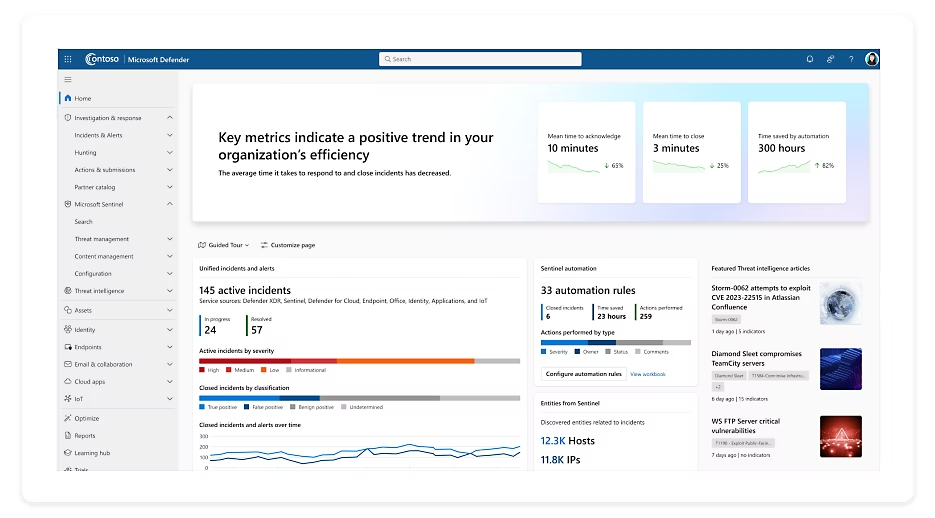
Microsoft Defender XDR (formerly Microsoft 365 Defender) combines signals from different security domains (identities, endpoints, email, SaaS applications and cloud workloads) to reduce alert noise, detect real incidents and accelerate response. XDR provides multi-domain analysis, built-in correlation rules and automatic remediation, all working in close integration with Microsoft Sentinel as the SIEM layer.
Key capabilities
- Cross-domain correlation — combines alerts from devices, email, identities and cloud into a single incident.
- Noise reduction — grouping of related alerts, prioritisation by risk and impact.
- Automated response — automated investigations (AIR) and remediation (isolation, revoke tokens, mailbox remediation).
- Hunting and analytics — built-in queries, advanced scenarios and cross-domain telemetry.
- Copilot for Security integration — accelerated triage and generation of remediation actions.
How it works — signal sources
- Endpoint — Microsoft Defender for Endpoint (Windows, macOS, Linux, mobile, IoT).
- Email and collaboration — Microsoft Defender for Office 365 (Exchange Online, SharePoint, OneDrive, Teams).
- Identity — signals from Entra ID/Identity, sign-in/device/conditional access risk.
- Cloud and SaaS — applications and workloads in Azure and integrations with external services.
Automation and orchestration
- Auto-investigation & remediation (AIR) — semi- and fully-automated remediation actions.
- Multi-layer response — from device isolation, through mailbox clean-up, to token revocation.
- Playbooks — ready-made response workflows and the ability to orchestrate with Logic Apps and Sentinel.
Integration with Microsoft Sentinel
Defender XDR delivers correlated incidents and detailed telemetry to Microsoft Sentinel, which acts as SIEM/SOAR at the organisational level. This gives you a central view, advanced analytical rules (KQL), UEBA and response automation at SOC scale.
Licensing — summary
- Microsoft Defender XDR is included in Enterprise-tier bundles (e.g. M365 E5); it can also be combined with Defender for Endpoint/Office 365 plans.
- The level of automation and hunting depends on the plans held (e.g. EDR/AIR in P2 for Endpoint, advanced investigations in P2 for Office 365).
Microsoft Sentinel — SIEM/SOAR in Azure
Microsoft Sentinel is a cloud-native SIEM and SOAR solution that enables organisations to centralise security data, detect threats, analyse incidents and automate responses at global scale. Thanks to the flexibility of Azure, it allows rapid SOC deployment without the need to maintain your own infrastructure.
Key capabilities
- Scalable log collection and real-time analysis.
- Built-in KQL query language for threat hunting and signal correlation.
- Response automation via playbooks in Logic Apps.
- Hundreds of out-of-the-box connectors — including Microsoft 365, Defender XDR, Azure, AWS, Palo Alto, Cisco.
- Advanced analytics and UEBA (User and Entity Behavior Analytics).
Example deployment scenarios
- Building a Security Operations Centre (SOC) in Azure.
- Correlating signals from Defender XDR and other Microsoft Security tools.
- Anomaly detection and insider threat identification using UEBA.
- Automated incident responses via Logic Apps and automated playbooks.